Instagram Reels to Text: Where the 5-Minute Limit Comes From, and What to Do Past It
The cap is about megabytes coming in, not kilobytes going out. That single fact explains almost every length question people ask about Instagram reels to text tools.
Main guide: Instagram transcript — paste a link, get the full text. The page you are reading covers one specific case in depth.
Short answer: when an Instagram reels to text tool stops at five minutes, that number almost never comes from Instagram and almost never comes from the speech model. It comes from the tool’s own budgets — the bytes it has to download, the seconds of processor time it is willing to spend, the request timeout its host enforces, and the minutes it is paying for on a speech API. All four are commercial limits that a competitor can raise or remove without notice. And the arithmetic says the cap is mostly beside the point: across eleven real public Reels measured while building this site, the longest was 178.7 seconds and the median was 83.0 seconds — not one of them came within a minute and a half of the five-minute mark. Meanwhile the entire text of an 85-second Reel weighs 1.2 KB, about four and a half thousand times less than the audio it came from. Below: the five budgets a cap can come from, the measured length distribution, the one three-minute number in this site’s own code that has nothing to do with video length, and a split-and-stitch procedure for the clips that genuinely are too long.
Visual guide: what was measured, and what is not a cap
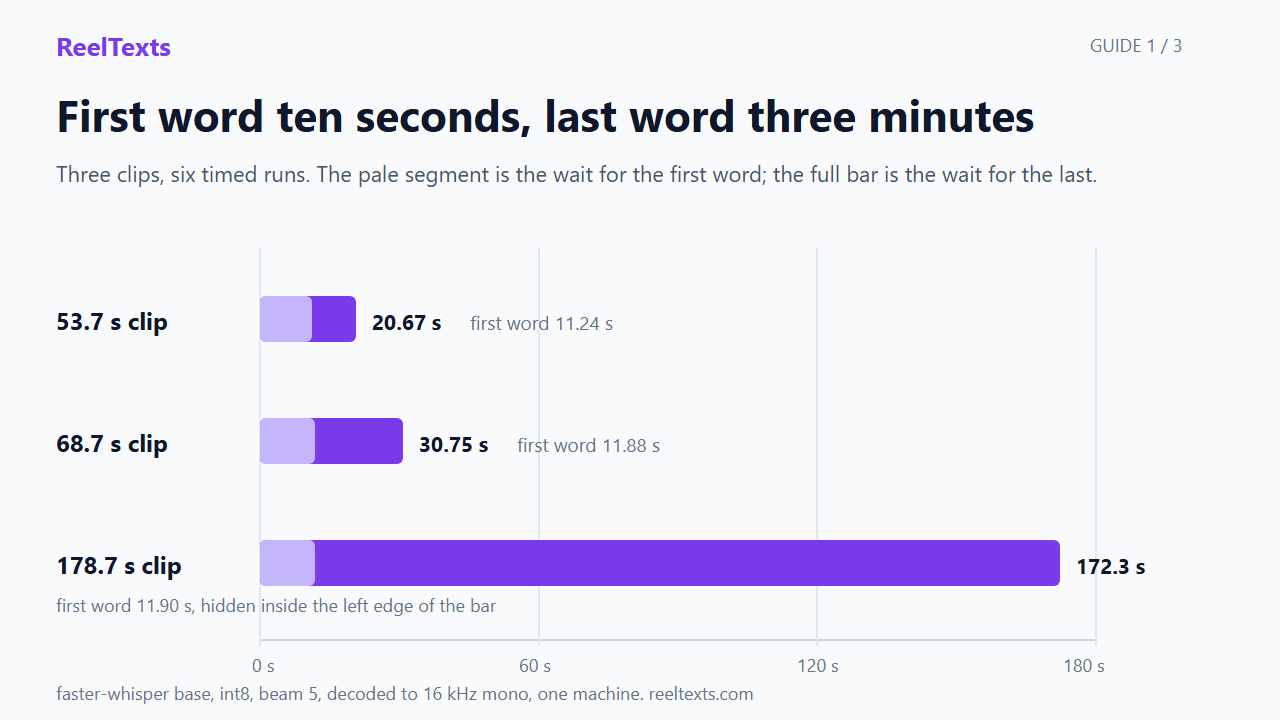
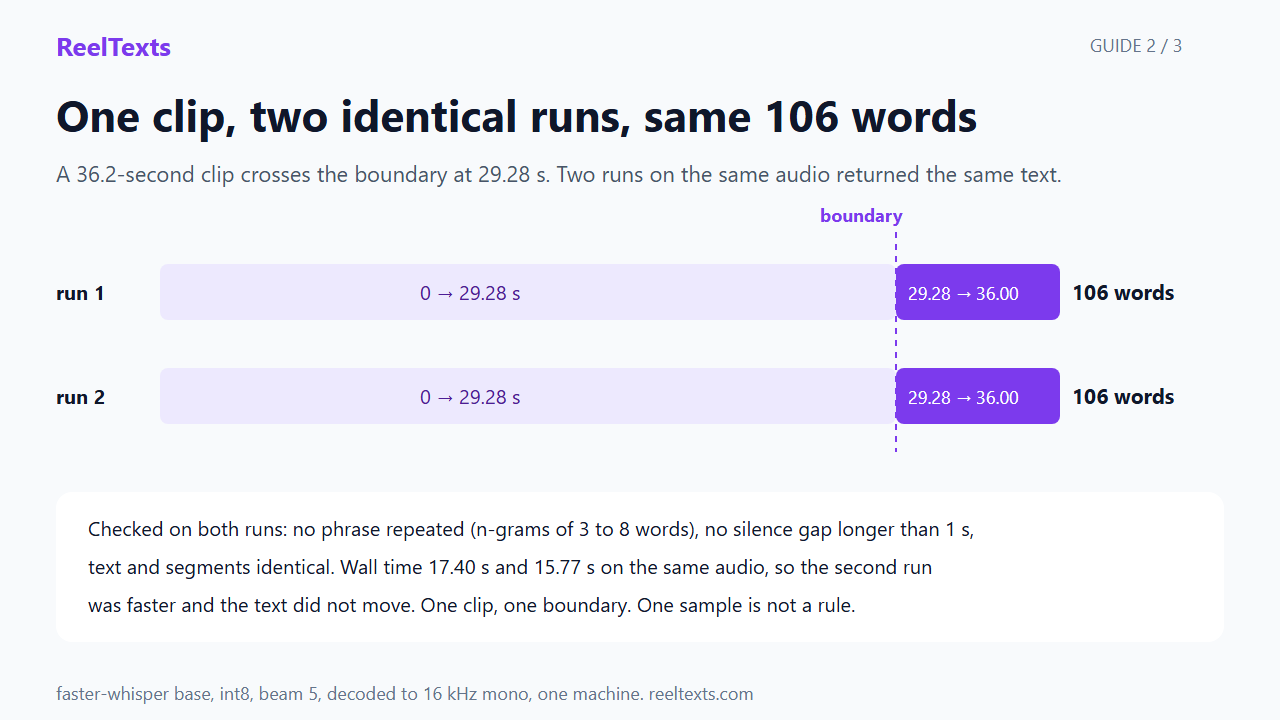
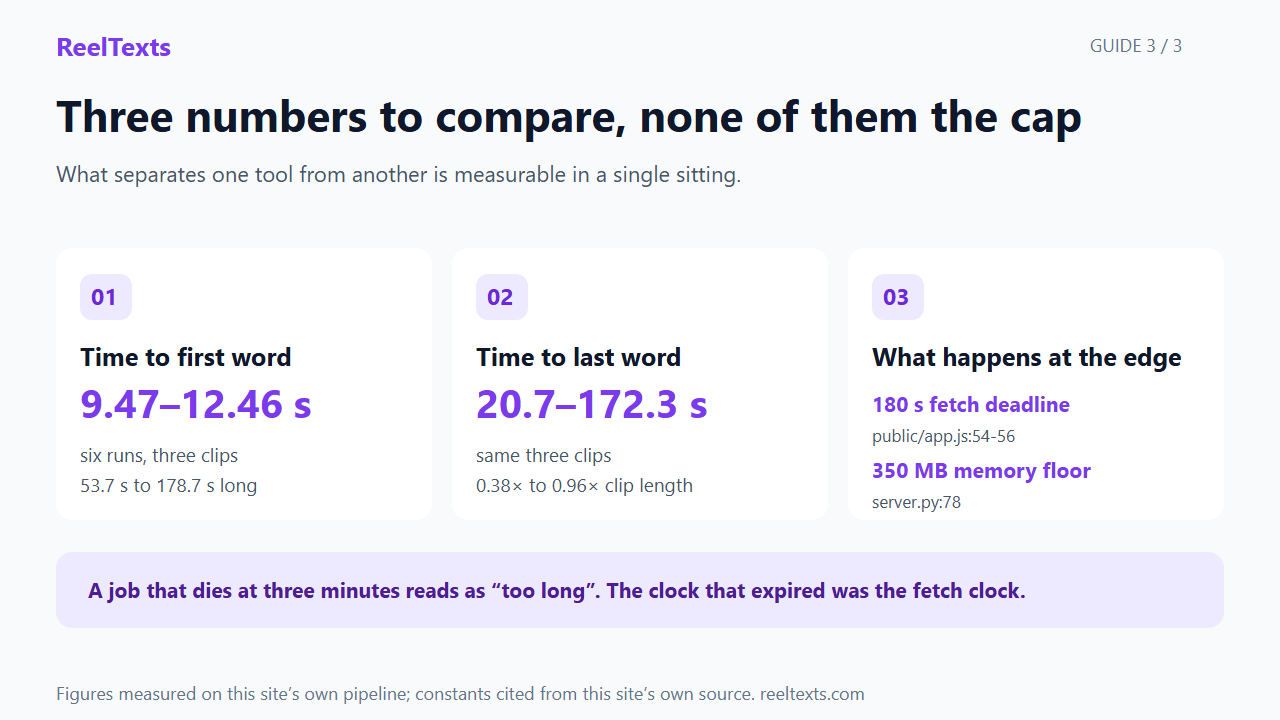
Three slides from the guide below: six timed runs on this site’s own pipeline, one boundary crossed twice, and the three numbers worth comparing instead of a cap.
Watch the guide
Three slides, thirty seconds, English captions in the player. The numbers on the slides are the ones reported in this article.
Five budgets, and only one of them is about the model
A length limit is a wall, and walls have causes. For an Instagram transcript tool there are five plausible ones, and they behave completely differently when you push against them. Knowing which one you hit tells you whether to retry, reformat, or go elsewhere.
| Budget | What it actually limits | How it fails |
|---|---|---|
| Transfer | Bytes the tool must pull down before it can hear anything. Video is thousands of times larger than the text it produces, so this is the heaviest line item in the whole job. | Fails early, on size rather than duration. A long, heavily compressed clip may pass where a short, high-bitrate one fails. |
| Compute | Processor seconds the speech model is allowed to consume. On a CPU-only machine, recognition runs at roughly the speed of the audio itself or slower, so a five-minute clip is five minutes of work, not five seconds. | Fails gradually. You get progress, then a stall, then nothing. The wall-clock time is proportional to the clip. |
| Request window | How long a single server request may stay open. Serverless platforms cut requests off at tens of seconds, occasionally a few minutes, and the number is set by the host rather than by the app. | Fails at a fixed elapsed time, whatever the clip length. This is the signature worth memorising. |
| Billing | Metered minutes on a paid speech API. Free tiers are sold in minutes, so a minute cap is a price list, not an engineering fact. | Fails with a quota message, or silently returns a truncated result when the meter runs out mid-clip. |
| Concurrency | How many jobs one worker will hold at once. A long job occupies a slot for its whole duration, so long clips are expensive even when they are free. | Fails under load, not on length. The same clip works at 3 a.m. and fails at noon. |
| Model window | Nothing, in practice. Speech models of this family read about thirty seconds of audio at a time and then continue with the next stretch, so a boundary between stretches is a place to check. On the one clip measured here that crosses a boundary, two identical runs returned the same text with no phrase repeated and nothing missing. One sample is not a rule. | Does not fail. This is the one row on the list that is genuinely not a cap, which is why it is worth separating from the others. |
Only the last row belongs to the model. The first five belong to whoever is paying the hosting bill, and that is why two tools can both advertise transcripts for Instagram while one stops dead at five minutes and the other does not. It also explains why the round number is five: five minutes is a generous-looking figure that is cheap to enforce, not a cliff that the technology falls off. There is nothing special about second 300. A tool that stops at five stops there because someone typed five into a configuration file.
Measured: how long public Instagram videos actually are
Before arguing about caps, it is worth knowing what lengths you are actually dealing with. These are the length records from this site’s own pipeline for eleven public Reels, captured while the tool was being built. Lengths and word counts are measurements.
| Clip | Length (measured) | Words returned (measured) | Words per minute |
|---|---|---|---|
| Clip A | 14.4 s | 28 | 117 |
| Clip B | 53.7 s | not recorded | — |
| Clip C | 62.8 s | 167 | 160 |
| Clip D | 67.9 s | not recorded | — |
| Clip E | 68.7 s | not recorded | — |
| Clip F | 83.0 s | 233 | 168 |
| Clip G | 85.3 s | 205 | 144 |
| Clip H | 87.2 s | 271 | 187 |
| Clip I | 112.7 s | 323 | 172 |
| Clip J | 119.7 s | 299 | 150 |
| Clip K | 178.7 s | not recorded | — |
Eleven public Reels processed by this site’s pipeline. Lengths are the durations returned with each post; word counts are the raw output of the transcriber, uncorrected. Four clips were processed for length only, so no word count is shown for them — that is a gap in the record, not a zero. Identifying details of every post are omitted. One segmentation was measured for this page, on a 36.2-second clip: 0 to 29.28 seconds, then 29.28 to 36.00 seconds. That is one clip, not a rule.
The shape of the sample matters more than any individual row:
- Total: 934.1 seconds across eleven clips.
- Mean: 84.9 seconds. Median: 83.0 seconds.
- Shortest: 14.4 seconds. Longest: 178.7 seconds, or two minutes fifty-eight point seven.
- Clips over five minutes: none. Clips over three minutes: none. Clips over two minutes: two.
Eleven clips is a small sample and it is not a survey, so treat it as an illustration rather than a distribution. But the direction is not surprising to anyone who uses the format: short video is short. A cap at five minutes sits above every clip in this sample by a wide margin, and above the median by three and a half times. For most of what people actually want to transcribe on Instagram, the cap is not the thing that will stop them.
The arithmetic that makes the cap look beside the point
Here is the asymmetry that explains why length caps exist and why they are set where they are. Take a five-minute clip, the length that a typical tool refuses to go past.
| Quantity | Size for a 5-minute clip | How it is derived |
|---|---|---|
| Text produced | about 5 KB | 750–870 words at the measured speech rate, at the measured 6.56 characters per word including the trailing space. |
| Audio, decoded to 16 kHz mono | 19.2 MB | 300 seconds at 16,000 samples per second, 4 bytes per sample. |
| Video, as downloaded | tens of megabytes | Arithmetic on an assumed mobile bitrate of about 2 megabits per second: 0.25 MB per second, times 300 seconds, is 75 MB. Bitrate varies, so treat this row as an order of magnitude rather than a figure. |
| Processor time | minutes, not seconds | A CPU-only speech model runs at roughly the speed of the audio or slower. The exact ratio depends on the device and is not measured here. |
Read the first two rows together. The output is about five kilobytes. The audio is about nineteen megabytes. The ratio is roughly four thousand to one, and against the video file it is more like fifteen thousand to one. Every cost in the job scales with the input and none of it scales with the output.
Which means: a length cap is a cap on megabytes, not on words. Raising it costs the tool money in bandwidth and processor time, and buys you a file you could have pasted into a chat message. That is why caps cluster at round commercial numbers — five minutes, ten minutes, thirty minutes of free credit — and why the limit you hit says much more about the business model than about the state of the art.
The one time limit in this site’s own code, and why it is not a length limit
It is worth showing a concrete example, because the confusion between a time limit and a length limit is the single most common mistake in this area. This site’s transcriber contains exactly one hard deadline, and here is what it does.
- It is three minutes long. The client code starts a lookup job, then polls it every four seconds with a deadline of 180,000 milliseconds.
- It applies to finding the video, not to reading it. The deadline covers the step that turns a link into a direct video address. The speech model is called afterwards and is given no deadline at all.
- It is the same deadline for every clip. A fifteen-second Reel and a three-minute Reel get the identical 180 seconds to be located. Length does not enter into it.
- The observed lookup time is a fraction of it. The code’s own notes record the lookup answering synchronously in about forty-one seconds in some cases and as an asynchronous job taking about a hundred and five seconds in others. Both are comfortably inside the three-minute window, and both are unrelated to how long the video is.
So the stack contains a three-minute number, and it has nothing to do with video length. Meanwhile the part that actually does scale with length — the transcriber — has no maximum at all: the speech model reads the audio in segments of roughly thirty seconds and returns text for each one, which is how the library behaves rather than a setting this site chooses. Length is absorbed by running the model more times, not by refusing the file.
The diagnostic worth keeping. If a tool dies at the same elapsed time on a forty-second clip and a four-minute clip, it is hitting a request or lookup timeout, and the clip length is irrelevant to the failure. If it dies at a time proportional to the clip, it is hitting a compute or billing budget. The two failures look similar on screen and mean opposite things.
Where a long clip actually breaks
Once you separate the two kinds of limit, the practical failure modes on long clips become predictable. These are the five worth knowing, in the order they usually appear.
- The lookup times out before the audio is ever touched. The error mentions waiting for the video, and it arrives at a fixed wall-clock moment. The tell is that a short clip fails the same way. Retrying may work, because the lookup is the flaky part, not the length.
- The first run pays for the model download and the transcription at the same time. A speech model is fetched once and then cached by the browser, so the first attempt on a new device is far slower than every attempt after it. If your first ever job is a long clip, you cannot tell a slow download from a slow transcript. Transcribe a twenty-second clip first to warm the cache, then do the real one.
- Memory, not time, becomes the binding constraint. Decoded audio is held as a floating-point array, and the cost per second is fixed: 16,000 samples per second at four bytes each is 64 KB for every second of audio. That is small in isolation and not small when the machine is already tight.
- Length is not speech. A five-minute clip with a long music bed, a silent intro and a pause-heavy delivery can honestly return two minutes of words. This is the failure that is not a failure, and people mistake it for truncation constantly.
- A chunk boundary is where to look if a transcript reads wrong. A phrase emitted twice, or a short run of words missing between two segments, is what a boundary defect looks like. On the one clip measured here that crosses the boundary, two identical runs returned the same text with no phrase repeated and nothing missing. One sample is not a rule.
The memory point is worth a table of its own, because it is the one quantity that grows with length and is easy to check. Every row is arithmetic on the same two constants: 16,000 samples per second, four bytes per sample.
| Clip length | Decoded audio in memory |
|---|---|
| 30 s | 1.9 MB |
| 60 s | 3.8 MB |
| 90 s | 5.8 MB |
| 180 s | 11.5 MB |
| 300 s | 19.2 MB |
| 600 s | 38.4 MB |
One segmentation was measured for this page, on a 36.2-second clip: 0 to 29.28 seconds, then 29.28 to 36.00 seconds. That is one clip, not a rule. No window count for any other clip length is stated in this table, because none has been measured.
The complete transcript of an 85-second Reel
To make the size asymmetry concrete, here is a real transcript in full. It is the entire output for a clip measured at 85.3 seconds: 205 words, 1,224 characters, or about 1.2 KB of text. It is not an extract. This is everything the tool returned.
Complete output, one 85.3-second Reel
hundreds of millions of people worldwide are walking around, exhausted, untreated, and thinking it's normal to feel this way. We've been taught to push through exhaustion instead of asking about it. This isn't an epidemic of laziness, it's a failure of diagnosis. We dismiss people with sleep disorders all the time. We think sleep apnea only affects middle aged men with thick necks and square jaws. It can affect anyone at any age and any size. Now thankfully we've started to recognize that sleep is vital. One of the most important things you can do for your physical or mental health. When you get enough sleep, your body performs quiet miracles, repairing cells, balancing hormones, clearing toxins from your brain. Sleep is where creativity is born, memories are filed, and the subconscious gets to color outside the lines. Sleep is the engine of productivity. After this, your activation, your permission slip, your reclamation, your literal wake-up call to question not just your sleep, but how you feel during the day. If something is off, ask for help, demand answers, see a sleep specialist, not just for your health, but for the idea, the project, the relationship, the version of you that's waiting to wake up.
Real, uncorrected pipeline output from one public Reel, reproduced in full and unedited — including the run-on sentences and the missing full stop after vital, which are artefacts of the recogniser rather than edits. Identifying details of the post are not shown.
Three things follow from printing the whole thing rather than a sample.
- The output is trivially small. 1.2 KB is smaller than a single photograph from the same video. The audio it came from, decoded for the model, is 85.3 seconds at 64 KB per second, which is about 5.5 MB — roughly four and a half thousand times the size of the text.
- The text is dense enough to be usable and raw enough to need a pass. There is no full stop after vital, and several sentence fragments run together. That is what the transcriber produced; the cleanup is a separate, short step, which is what the link-to-draft walkthrough covers.
- Words per minute is the number to carry forward. 205 words in 85.3 seconds is 144 words per minute, at the low end of the 144 to 187 range this sample produced. That range is the whole basis of the self-check below.
One reel to text: three single-run timings on this site’s own pipeline
Turning one Instagram reel into text is one paste and one wait, and the wait is the part that almost nobody measures. Three public reels were run through this site’s own pipeline for this page, one paste each, nothing batched, nothing queued:
| Reel | Reel length | Words returned | Wall time, paste to text |
|---|---|---|---|
| DG6fw8uvZJe | 170.3 s | 383 | 144.4 s |
| DerULKUCVdj | 39.2 s | 140 | 79.7 s |
| Der50vaTZeT | 66.8 s | 228 | 127.5 s |
The wall time does not track the reel’s length. The 170-second clip handed back its text in 144.4 seconds — faster than watching it — while the two shorter clips each took roughly twice their own length, because a single run carries a fixed start-up cost, fetching the media and loading the speech model, that a short reel cannot amortise. For a one-reel job that overhead is invisible: paste, wait a minute or two, copy the text. It only starts to matter when the same work is scaled up, which is where the budgets and the split-and-stitch arithmetic above take over.
Two more numbers from the same three runs, both independent of the tool: the transcripts ran 22.5 to 35.7 words per 10 seconds of audio, and reading each transcript aloud took 0.67 to 1.07 times the reel’s runtime. A reel whose transcript takes longer to read than to watch is a reel whose speech is packed tight, which both short reels here were, and nothing about that changes past any length cap.
How long you have to wait, by clip length
First word ten seconds, last word three minutes. That is the whole shape of the wait: the first line comes back in 9.5 to 12.5 seconds on every clip measured, whether it runs 54 seconds or 179, while the last word is the part that grows with the audio — 20.67 seconds on the short clip, 172.3 seconds on the long one.
| Clip length | First word | Full transcript | Full transcript ÷ clip length |
|---|---|---|---|
| 53.7 s | 11.24 s | 20.67 s | 0.38× |
| 68.7 s | 11.88 s | 30.75 s | 0.45× |
| 178.7 s | 11.90 s | 172.3 s | 0.96× |
Three public reels, first paste of the day each, one machine, one model: base, int8, beam 5, decoded to 16 kHz mono. First-word times are when the first segment came back, not when the job finished. Six runs in total, cold and warm paired on the same clips — first word then full transcript, cold/warm: 53.7 s, 11.24/11.22 s and 20.67/20.55 s; 68.7 s, 11.88/9.47 s and 30.75/24.95 s; 178.7 s, 11.90/12.46 s and 172.3/146.25 s. Keeping the model resident saved at most 26.1 seconds, on the longest clip, and moved the first word by no more than 2.4 seconds.
The right-hand column is the one worth carrying: a clip near a minute costs about 0.4 times its own length, a clip near three minutes costs about its own length. The first-word column does not move with it — 11.24, 11.88 and 11.90 seconds across a 3.3-fold spread in length — so the ten seconds you notice is fixed, while the wait that decides whether a folder of instagram reels to text gets through tonight is the last column.
If your clip is longer than the tool allows: split and stitch
Suppose you have a file longer than your tool’s cap — a long upload, a downloaded video, a livestream replay. Splitting it yourself is straightforward, but there are four ways to do it badly, and each one produces text that looks fine and is not.
- Cut at silence, never mid-word. Find a pause of at least half a second and cut there. A cut through a word leaves half an utterance at the end of one segment and the other half at the start of the next, and the model will invent a plausible word for each rather than report a problem.
- Overlap the segments by about one second. End segment one at T and start segment two at T minus one. The overlap is your alignment anchor: the tail of the first transcript and the head of the second describe the same second of audio, so you can find the join by reading rather than by guessing.
- Keep the order in the filenames.
01,02,03before transcription, not after. Reordering transcripts afterwards is where joins get lost. - Check every segment before transcribing the next one. Count the words and compare against seconds multiplied by 2.5 to 2.9. A segment that comes back far short is truncated, and finding that out after six segments wastes the whole run.
Then stitch, in this order:
- Line up the overlap. The last few words of segment one and the first few of segment two are the same speech. Find the matching phrase.
- Delete the duplicate, not the join. Keep one copy of the overlapping words. Deleting the whole overlap region removes a second of real speech.
- Expect to lose punctuation, not words. The model has no idea a cut happened, so it will not place a full stop where your cut was. Read the join and punctuate it yourself.
- Reconcile the totals at the end. Add the segment lengths and compare the total word count with total seconds multiplied by 2.5 to 2.9. If the sum is inside that band, the stitch did not lose a block.
Here is the same thing with numbers attached. A ten-minute file, 600 seconds, against a tool that stops at five minutes.
| Step | Figure | Basis |
|---|---|---|
| Segments needed | 2, of 300 s and 301 s | Two halves with a one-second overlap, so the second half starts at 299 s. |
| Manual joins | 1 | The cut you made. |
| Total places text can go wrong | 1 | The join you made. Seams inside a segment are not counted here, because only one segmentation has been measured on this page. |
| Words to expect | 1,500 to 1,740 | 600 seconds at the measured 2.5 to 2.9 words per second. |
| Text size to expect | about 10 KB | 1,500 to 1,740 words at the measured 6.56 characters per word. |
Derived figures. The word counts and the character rate come from measurements on this site’s own pipeline; the ten-minute file and the five-minute cap are a worked example, not an observed job. No window or seam count is given for a 300-second segment, because none has been measured.
The self-check that catches almost everything: words divided by minutes of audio should land between 144 and 187. Below that band means audio that contains no speech, or a truncated result. Above it means repetition, which is the signature of a seam that was stitched twice. One division catches both.
Why the number moves, and why that is the point
People search for the length limit expecting a constant, and there is not one, for two separate reasons.
The first is that the platform’s own maximum has changed repeatedly. The in-app ceiling has moved through fifteen seconds, sixty seconds, ninety seconds and beyond, and the figure quoted most often now is around three minutes, with longer videos available to some accounts through some upload routes. Because it moves, the honest instruction is to check the app rather than a blog post, including this one. No number written into an article about a moving limit stays true.
The second reason is the more important one. The platform’s maximum and a tool’s maximum are two different numbers set by two different parties. Instagram raising its ceiling does nothing for a tool whose cap comes from a hosting bill, and a tool raising its cap does nothing about a private link. When you read a stated limit, ask which of the five budgets it comes from, because that tells you whether it is permanent, negotiable, or an accident of someone’s pricing page.
A sixty-second test for any tool’s real cap
- Look for the stated limit. If there is none, that is information: the real cap is whatever the host’s request timeout is, and you will meet it as a failure rather than a message.
- Run a clip well under the stated limit. This confirms the pipeline works and warms the model cache on your device, so the next test is not polluted by a one-time download.
- Run one just over the limit. A refusal with a message means the cap is enforced in the interface. A job that starts and dies later means the cap is a timeout.
- Time the failure. Same elapsed time on a short clip and a long clip means a request timeout, and length is irrelevant. Time proportional to the clip means a compute or billing budget.
- Try a long but low-bitrate clip. If it passes where a shorter high-bitrate clip fails, the binding constraint is bytes, not duration — and you can often work around it by compressing rather than trimming.
If you have been through a bunch of tools to turn reels into text
The tools differ far less in the words they return than in three numbers you can measure in one sitting: how long the first word takes, how long the last word takes, and what the tool does when it runs out of something. On this page’s own pipeline the first word landed between 9.47 and 12.46 seconds across six runs on three clips of 53.7, 68.7 and 178.7 seconds, and the last word took 20.67, 30.75 and 172.3 seconds on those same three. A tool that advertises a length cap and none of those three numbers is advertising the only part that does not move.
The second number is what happens at the edge, which is where most of the “this tool is broken” comes from. This site’s own code gives up on fetching the media at deadline = t0 + 180000 and checks every four seconds (public/app.js:68-70); it also declines to start a job when free memory is under MEM_FLOOR_MB = 350 (server.py:78). That floor is not hypothetical: a run on this machine was killed at 328 MB with a LowMemory error. Neither of those is a length limit, and both look exactly like one from outside: a job that dies at three minutes reads as “too long” when the clock that expired was the fetch clock, not the model’s.
The third number is whether a long clip comes back whole. On the one clip measured here that crosses a boundary — 36.2 seconds, processed as 0 to 29.28 and 29.28 to 36.00 — two identical runs returned the same 106 words, with no phrase repeated and no silence gap longer than a second. One sample is not a rule. It is, though, the only claim on this page that has been run twice.
So the questions worth putting to any tool are four: time to first word on a clip you choose, time to last word on that same clip, the error text and the elapsed time when a job fails, and whether the transcript of a clip just past the stated cap contains the last sentence you can hear. All four are answerable in one sitting, and none of them is about the stated limit.
Every number in this section comes from either the six timed runs above or this site’s own source files, cited by file and line where a constant is involved.
Questions people ask
- Is there a five-minute limit on turning Instagram Reels into text?
- Not from Instagram, and not from the speech model. Where a five-minute limit exists it belongs to the individual tool, and it comes from its bandwidth, processor or billing budget. Speech models of this family read about thirty seconds of audio at a time and then continue with the next stretch, so length is absorbed rather than refused.
- Why do so many tools stop at five minutes?
- Because five minutes is a round number that is cheap to enforce and looks generous. The output is only a few kilobytes, so the cost is entirely in downloading the video and running the model. A cap is a way of bounding that cost without saying so on the pricing page.
- How long can an Instagram Reel be?
- Instagram has changed this several times and the figure varies by account and by how the video was uploaded, so any fixed number you read — including here — should be checked in the app. The relevant point is that the platform’s ceiling and a transcript tool’s ceiling are unrelated numbers.
- Can I transcribe a video longer than the tool’s limit?
- Yes, if you have the file. Cut it at silent pauses into segments shorter than the limit, overlap each cut by about a second, transcribe the segments in order, then join them at the overlaps. If you do not have the file, you are limited by what the tool can fetch.
- How long should a five-minute clip take?
- No measured figure is offered here, because it depends entirely on your device. As a rule of thumb, a CPU-only speech model runs at roughly the speed of the audio or slower, so budget several minutes for a five-minute clip, and add a one-time model download on the first run.
- Does a longer clip produce a worse transcript?
- The only place a long clip can differ is a boundary between stretches. Speech models of this family read about thirty seconds of audio at a time and then continue with the next stretch, so a boundary between stretches is a place to check. On the one clip measured here that crosses a boundary, two identical runs returned the same text with no phrase repeated and nothing missing. One sample is not a rule.
- My five-minute clip returned less text than I expected. Was it truncated?
- Not necessarily. Length is not speech: a long music bed, a silent intro or a pause-heavy delivery can mean a five-minute clip contains two minutes of talking. Divide the words by the minutes of audio. Inside the 144 to 187 band, the result is honest; far below it, the result is truncated or the clip has little speech in it.
- How long does one Instagram Reel take to turn into text?
- On this site’s own pipeline, three single-reel runs took 79.7, 127.5 and 144.4 seconds from paste to text, for reels of 39.2, 66.8 and 170.3 seconds. The wait does not scale with the reel: the 170-second clip returned text faster than watching it, while the two shorter clips each paid a fixed start-up cost about twice over. Treat a minute or two as the honest expectation for one paste, on hardware comparable to the machine that produced these figures.
The bottom line
A length cap on an Instagram reels to text tool is a budget, not a boundary. It exists because the tool has to move tens of megabytes and spend minutes of processor time to produce about five kilobytes of text, and because that is the part someone has to pay for. The speech model itself does not care how long the clip is; it reads thirty seconds at a time and moves on. So the practical advice is short. Check what the cap actually is by testing it, notice whether the failure arrives at a fixed time or a proportional one, and if you are past the limit with a file in hand, cut at silence, overlap by a second, and check the word count on every segment before you trust the stitch. And keep the number 144 to 187 in mind: it is the range this site’s own pipeline produced, and it turns an unanswerable question about quality into one division.
Affiliate link: Notta is a separate service that transcribes audio and video files you upload. This site earns a commission if you subscribe through that link, at no extra cost to you.